Now for macOS

Falcata Analyzer.
Your sprint data, on the big screen.

Everything you recorded on your wrist, on the big screen. Review every chart from every rep, overlay your speed and force data on your own footage, and get AI coaching grounded in your actual numbers — not generic advice. The same numbers your Watch captured. Free.

Free · macOS 15 or later · No account required

Same numbers as your Watch AI coach using your real data Works offline Video · chart · data export
Falcata Analyzer on macOS showing synchronized velocity, drive force, power, acceleration, arm-swing, and ground-contact charts on a shared playhead, with a sprint dashboard and table on the left

Same numbers.
Bigger screen.

Falcata Analyzer opens the sprints you export from Falcata Run on your iPhone. Every chart on your Mac shows the exact numbers your Watch recorded — nothing recalculated, nothing estimated. What you saw on your wrist is what you study on screen.

Every signal,
one playhead.

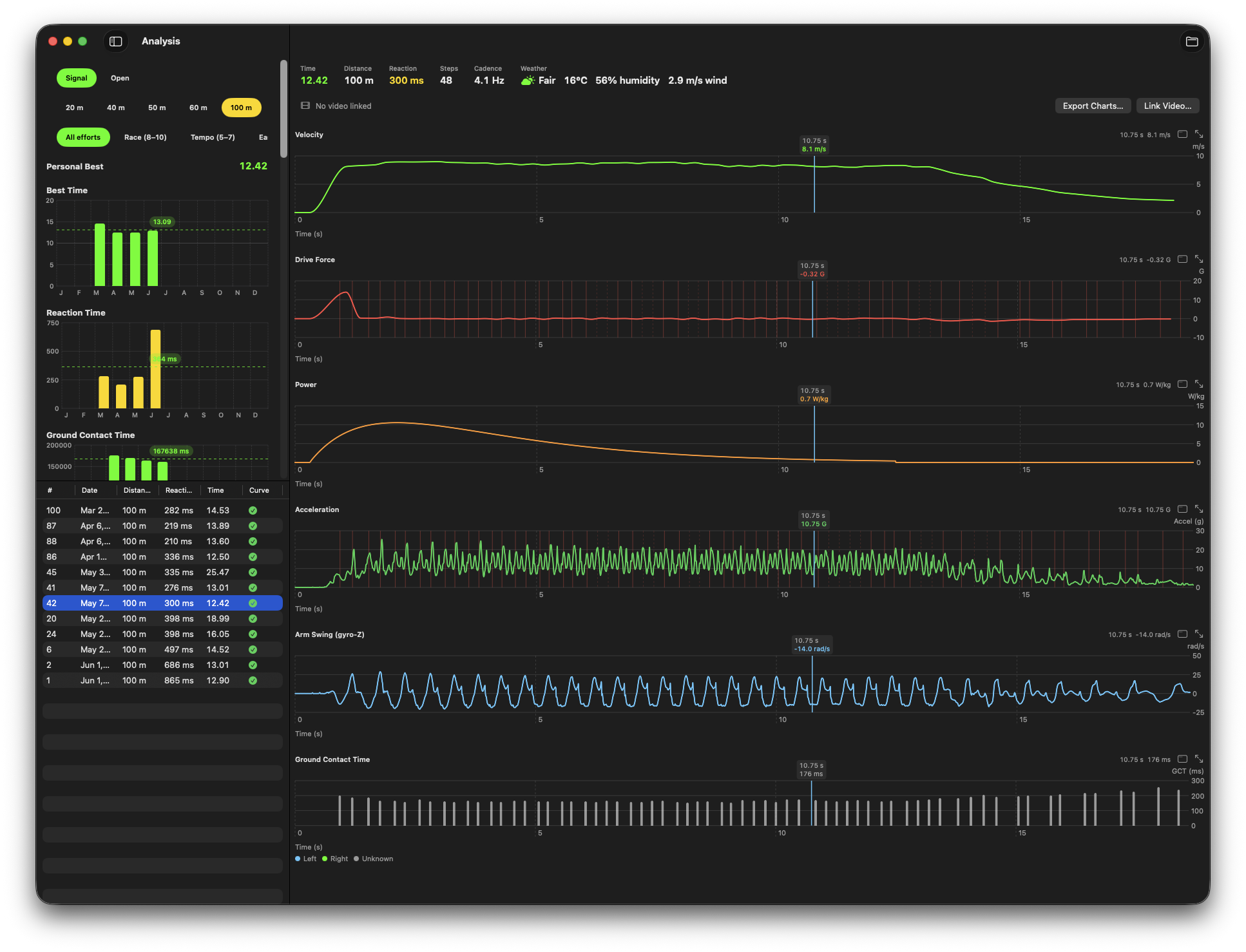
Velocity, drive force, power, acceleration, arm swing, and ground contact time — stacked and synchronized on a single scrubbable timeline.

  • One shared playhead across every chart — hover or drag to scrub them all at once.
  • Select a time range to read each lane's average over that interval.
  • Maximize a single chart, or pop lanes out into separate resizable windows and line them up side by side.
  • Foot strikes, markers, and the sprint window stay aligned across every lane.
Falcata Analyzer charts view — a left dashboard with Personal Best, Best Time, Reaction Time and Ground Contact Time summaries plus a sprint table, beside a stacked column of synchronized Velocity, Drive Force, Power, Acceleration, Arm Swing and Ground Contact Time charts sharing one playhead
Synchronized chart review with a shared, scrubbable playhead.

Your footage,
your telemetry, on top.

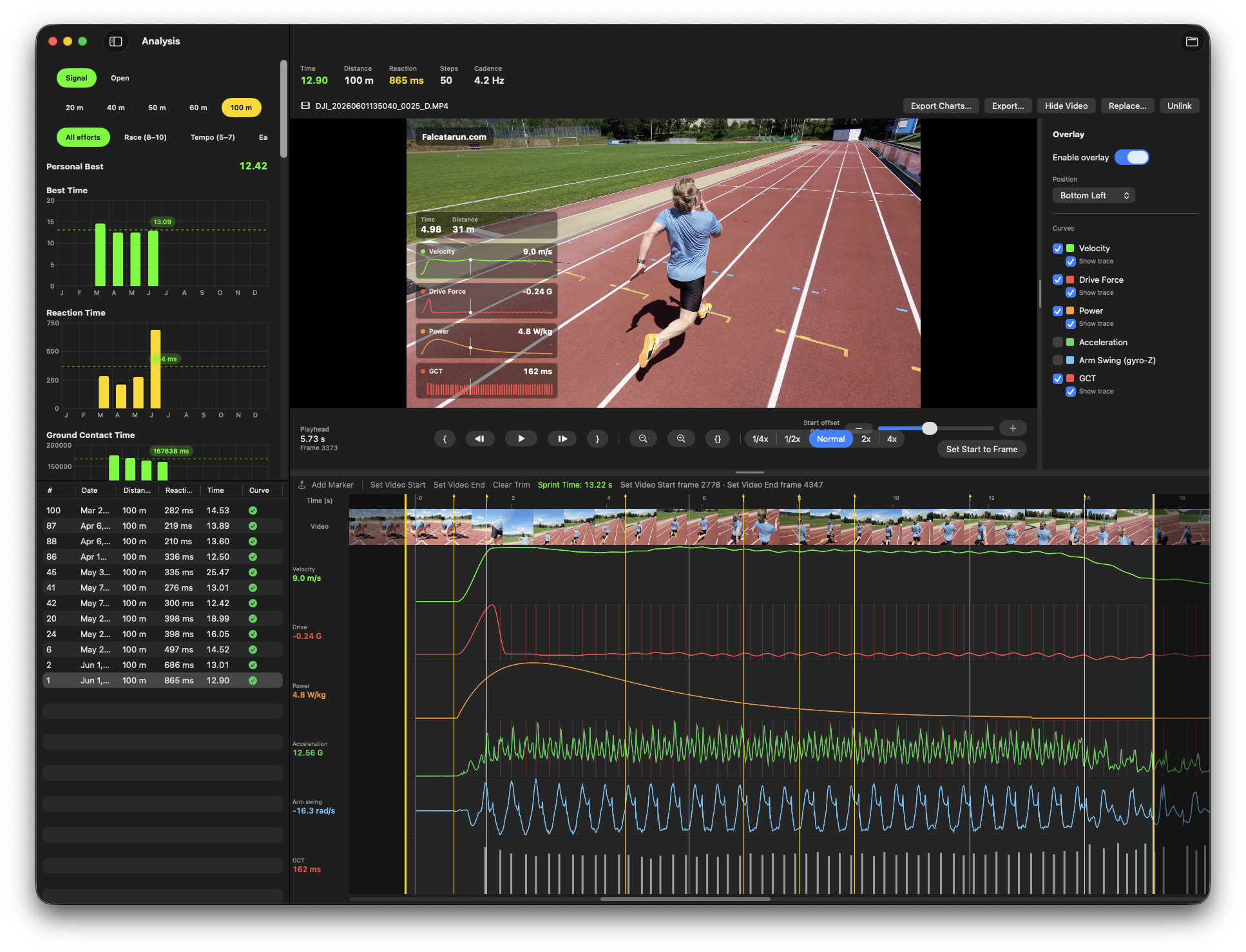
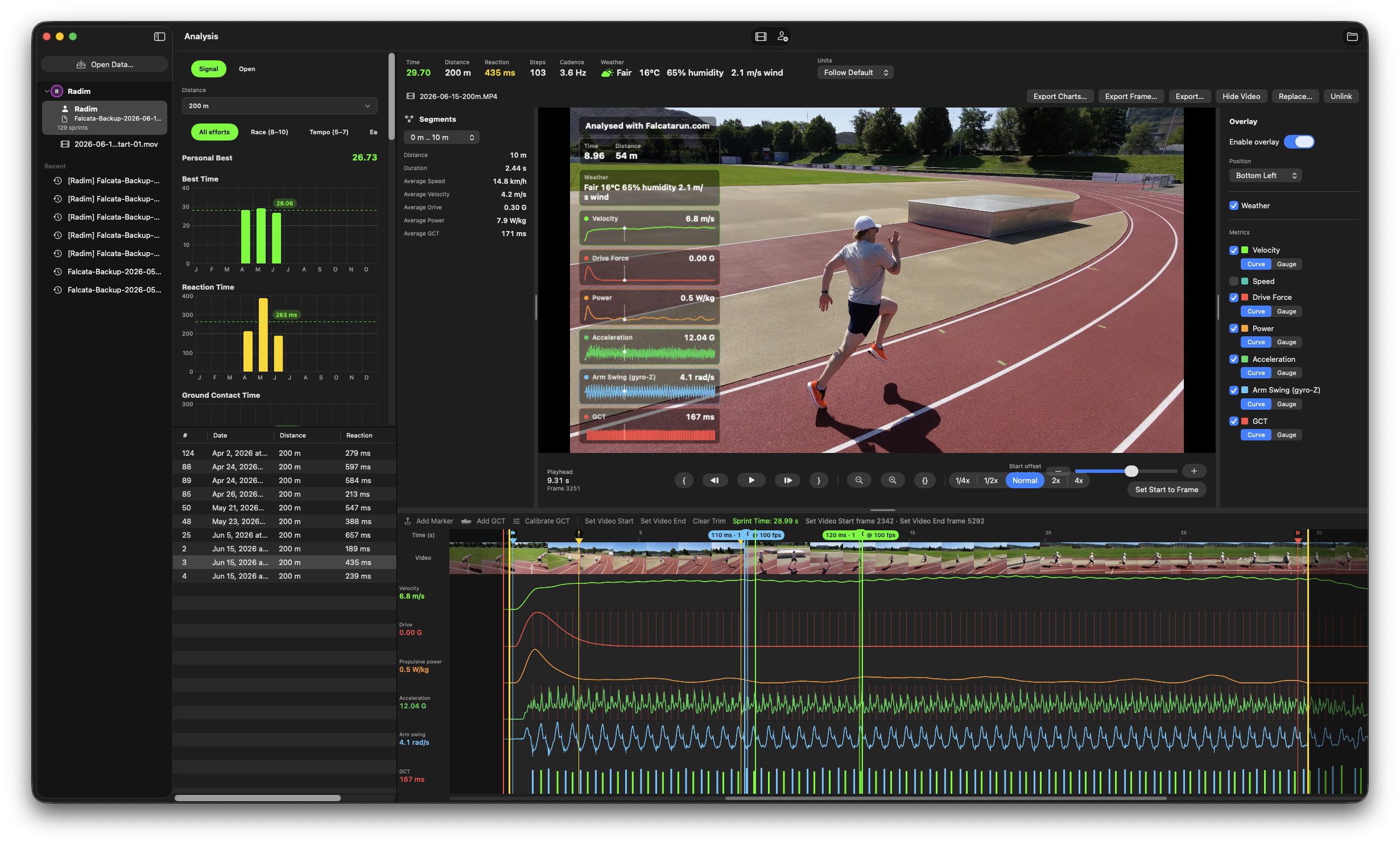
Link a sprint video and the Mac becomes a coaching desk that already knows your numbers. Line the clip up to the moment you left the blocks, trim it, and add your speed and force data as an overlay directly to the exported video.

  • Align footage to the "GO" moment and scrub through every stride frame by frame.
  • Edit Start, Finish, and Distance markers on the video or the charts — they stay in sync.
  • Choose which metrics appear over the video, locked to the same timeline as the charts.
  • Export a trimmed clip with your data overlay as MP4 or QuickTime, with control over quality and file size.
Falcata Analyzer video workspace — a sprinter mid-stride on a red outdoor track in the program monitor with a live telemetry overlay, an overlay inspector listing Velocity, Drive Force, Power, Acceleration, Arm Swing and GCT lanes, transport controls, and a timeline below combining a thumbnail filmstrip with synchronized signal lanes
The video workspace — program monitor, overlay inspector, and a synchronized timeline.

Built for review,
built for export.

Everything you need to study a sprint on the desktop and share what you find.

AI Sprint Coach

Coaching grounded in your real numbers. Ask why you were slower, where you lost time, what changed between reps — across your whole history. Works offline on your Mac or with your own AI account. Your data stays on your device.

Chart export

Export stacked charts as PNG or JPEG, on a dark or white background, with optional sprint info and a date-stamped attribution.

Video export

Render the trimmed clip with your telemetry overlay to MP4 or QuickTime, with real encoder control over resolution, FPS, and bitrate.

CSV export

Export your sprint data as a spreadsheet for your own analysis, with optional start/finish markers included.

Marker editing

Create and edit Start, Finish, and Distance markers on the charts or the video timeline. Edits live in a sidecar — your export is never modified.

Pop-out windows

Open any lane in its own native macOS window and arrange several charts side by side for a real multi-window analysis desk.

Single source of truth

The same system that captured your sprints on the Watch drives every chart on your Mac, so desktop numbers always match what you saw on your wrist.

Record on the wrist.
Open on the Mac.

Sprint with Falcata Run on your Apple Watch, review and share on the iPhone, then export a sprint file and open it in Falcata Analyzer for deep desktop review and video work. You need Falcata Run to capture the sprints the Analyzer opens.

Free · macOS 15 or later · No account required. You'll need Falcata Run on iPhone and Apple Watch to record the sprints the Analyzer opens.